Fill out the IRS's official Form W-9 (Rev. March 2024), sign it, and download the PDF to send to whoever asked for it — free, no sign-up, and nothing leaves your browser.
Required. For a sole proprietor or a disregarded entity, the owner's name goes here.
A trade name, DBA, or a single-member LLC's name.
Line 3a — check the one box that describes whose name is on line 1.
Only if the requester asked you to list one.
Part I — the number must match the name on line 1.
For individuals, sole proprietors and single-member LLCs owned by one person. A sole proprietor may use an EIN instead.
Line 4 — most individuals and businesses leave both blank. The codes are listed in the IRS instructions.
Part II — by signing you certify, under penalties of perjury, the four statements printed on the form: the number is correct, you are not subject to backup withholding, you are a U.S. citizen or other U.S. person, and any FATCA code is correct.
Prefer a pen? Leave the signature blank and sign the printed page.
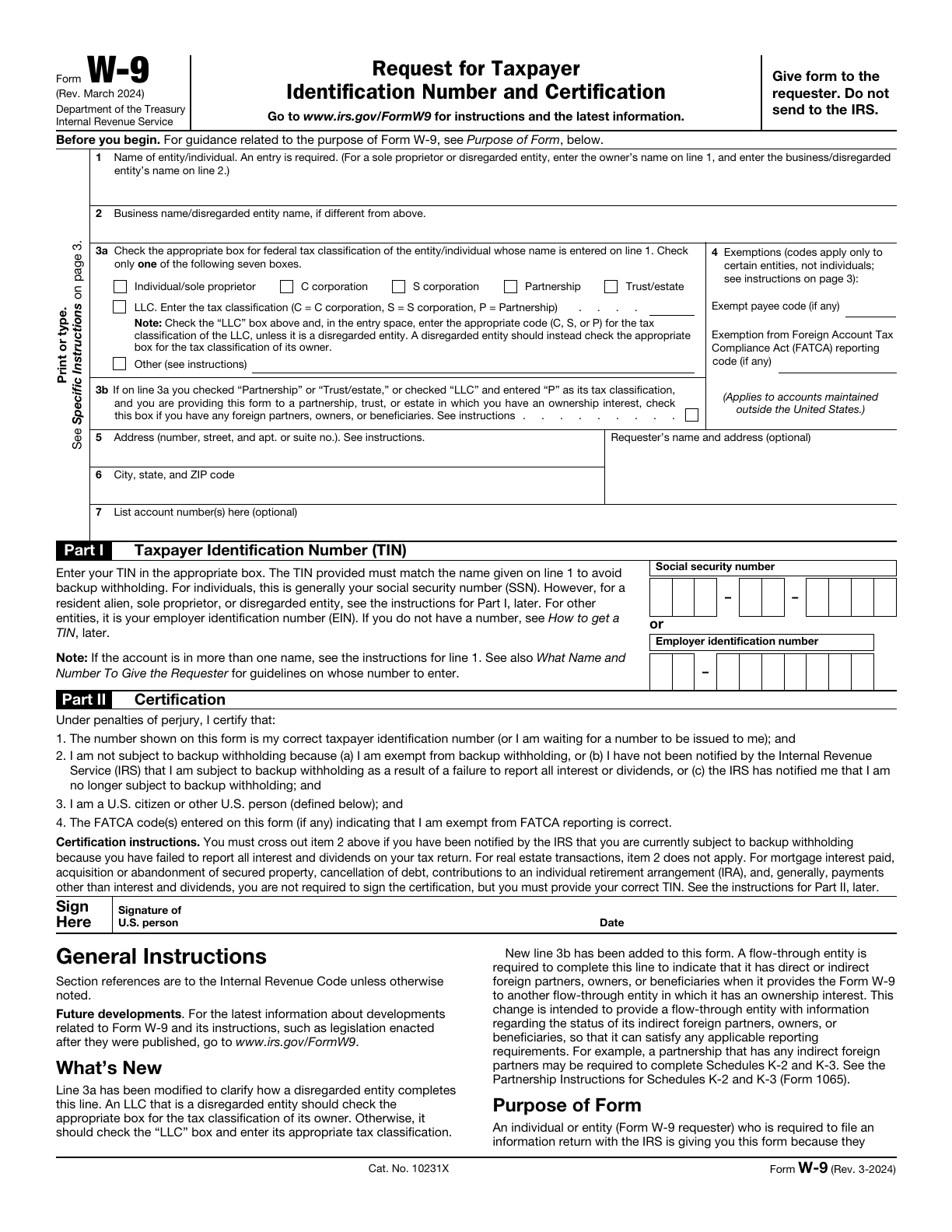
The real form. This is the IRS's own Form W-9 — Rev. March 2024, the current revision. Your answers go into its fields, the result is flattened into a plain PDF that every reader shows the same way, and by default only the one-page form is included. Keep the instruction pages if the requester wants them.
Private by design. The PDF is built right here in your browser. Nothing is uploaded, there is no account, and your draft lives only in this browser's storage. Your TIN and signature are the sensitive part, so they are not stored at all unless you switch on Remember my TIN and signature on this device.
Sign it — or don't. Draw your signature with a mouse, finger or pen and it is placed on the signature line beside the date. Prefer ink? Leave it blank, print the PDF and sign by hand.
One W-9, many requesters. Freelancers send a W-9 to every client. New W-9 keeps your details and signature, clears the requester block and the account numbers, and dates the form today.
Line 1 — your name as it appears on your income tax return. Sole proprietors and single-member LLCs put the owner's name here. Line 2 — a business name, DBA or the LLC's name if it differs from line 1.
Line 3a — the tax classification of the name on line 1. A single-member LLC owned by one person is a disregarded entity: check Individual/sole proprietor, not LLC. Check LLC only when the LLC is taxed as a C corporation, an S corporation or a partnership, and enter which. Line 3b is only for partnerships, trusts, estates and LLCs taxed as partnerships that have foreign partners, owners or beneficiaries and are giving the form to a flow-through entity they own part of.
Line 4 — exemption codes for payees exempt from backup withholding or FATCA reporting. Almost always blank for individuals. Lines 5 and 6 — the address where the requester should mail your information returns (your 1099s). Line 7 — account numbers, only if the requester asks.
Part I — an SSN for individuals and sole proprietors (a sole proprietor may use an EIN), an EIN for corporations, partnerships, LLCs taxed as either, trusts and estates. It must match the name on line 1. Part II — sign and date. If the IRS has told you that you are subject to backup withholding, cross out item 2 of the certification by hand.
Who needs to fill out a W-9? Anyone a US business pays and has to report to the IRS — freelancers, contractors, landlords, vendors, and account holders at banks and brokerages. The requester uses it to prepare 1099 forms with your correct name and TIN.
Do I send the W-9 to the IRS? No. It goes to the person or business that asked for it, and nowhere else. This tool doesn't send it anywhere either — you download it and pass it on.
Is this the official form? Yes — the IRS's Form W-9, Rev. March 2024, filled in and flattened. The requester gets the same document they would from a form filled in Acrobat. The form and its instructions are at irs.gov/FormW9.
Is a drawn signature acceptable? Most requesters accept a signed PDF, and the IRS allows electronic W-9 signatures when the requester's system meets its rules. If in doubt, ask the requester — or leave the signature blank and sign the print-out.
Is it really free? Yes — no sign-up, no watermark, no limit on how many W-9s you make.
Where is my data stored? Only in this browser's local storage, on your device — and the TIN and signature only if you ask for them to be remembered. Start over erases everything.
